A sample prompt of what you can find in this page
Prompt by ed62762bca7

solid flat colors prompts

very few results

8 months ago

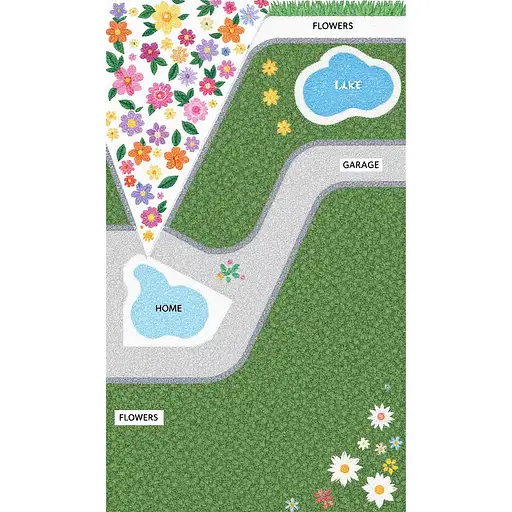
### **Core Instructions** "Generate a **strict top-down 2D site plan** with **no perspective**, divided into **three distinct zones** (GREENS, HOME, AGRICULTURE) as follows: --- ### **1. GREENS (Left Half of Image)** - **Flower Area**: Irregular triangle labeled *FLOWERS* in the **southwest corner**, filled with clustered flowers. - **Small Lake**: Circular water body labeled *LAKE* in the **northeast corner**, touching the gazebo. - **Grass**: Solid green fill covering all remaining space on the left half. --- ### **2. HOME (Vertical Center-Right Strip)** - **Villa**: Rectangular *R+1 villa* labeled *HOME*, centered vertically. Attach a smaller rectangle (*GARAGE*) to its **immediate right**. - **Gray Car Path**: Straight horizontal road labeled *LANE* running from the **south edge (MAIN ENTRANCE)** to the villa’s front door. Add a **blue circle (FOUNTAIN)** at the path’s midpoint. - **Connections**: - From the villa’s **north side**, draw two dotted paths: 1. **Westward** to an unlabeled oval (*POOL*). 2. **Northeast** to a pentagon labeled *GAZEBO*, crossing the lake’s edge. --- ### **3. AGRICULTURE (Right Half of Image)** - **Agricultural Field**: Large rectangle labeled *AGRICULTURAL FIELD* covering the entire right half. - **Animal Enclosures**: Two orange rectangles labeled *ANIMAL ENCLOSURES* in the **northwest corner of the Agriculture zone**. - **Vegetable Garden**: Green rectangle labeled *VEGETABLE GARDEN* centered **directly north of the villa**. --- ### **Critical Details** - **Trees**: Line both sides of the gray road from entrance to villa. Add a row of trees separating the villa from the Agriculture zone. - **Labels**: Use exact text from the user’s screenshot (e.g., *MAIN ENTRANCE*, *LANE*). - **No Overlaps**: Keep zones strictly separate (GREENS left, HOME center-right, AGRICULTURE right). - **Style**: Clean 2D schematic with flat colors, no shadows or depth. Mimic a technical blueprint.

9 months ago

A hyper-realistic, ultra-detailed full-body front-view depiction of Keeley Hazell with no expression. Her deep brown eyes remain neutral, with no noticeable emotion, ensuring a balanced and natural look. Her dark brown hair is styled in a messy bun, with a few loose strands framing her face. Her flawless skin is illuminated by soft, even lighting, enhancing her natural contours without harsh shadows. She has an ample chest, a naturally full bust, a defined waist, and balanced hips. Her symmetrical facial structure, high cheekbones, full lips, and softly defined jawline enhance her natural beauty. Her collarbones are subtly defined, naturally blending with her well-proportioned upper body. Her long, well-structured legs maintain their natural shape and symmetry. She is wearing a well-fitted mini dress in a solid color (adjustable for variations), subtly contrasting with the background. The dress hugs her natural curves without excessive compression, ensuring clear body definition. She is also wearing heels or is barefoot, depending on the preferred styling. Pose: She stands with her feet flat on the ground, body fully visible from head to toe, arms resting naturally by her sides. The pose is neutral, ensuring an accurate full-body representation with true-to-life proportions. The background is plain and neutral, ensuring full focus on her body proportions. The soft, natural lighting enhances depth and realism while avoiding extreme contrast. This setup is ideal for LoRA training, preserving consistency in body structure and expression. Shot in HDR 4K, ultra-detailed textures, extreme photorealism, cinematic quality, with true-to-life proportions and no distortion.

8 months ago

**SORA Image Generation Prompt: Exact Site Plan Matching "INSHAALLAH.png" Layout** --- ### **Core Instructions** "Generate a **strict top-down 2D site plan** with **no perspective**, divided into **three distinct zones** (GREENS, HOME, AGRICULTURE) as follows: --- ### **1. GREENS (Left Half of Image)** - **Flower Area**: Irregular triangle labeled *FLOWERS* in the **southwest corner**, filled with clustered flowers. - **Small Lake**: Circular water body labeled *LAKE* in the **northeast corner**, touching the gazebo. - **Grass**: Solid green fill covering all remaining space on the left half. --- ### **2. HOME (Vertical Center-Right Strip)** - **Villa**: Rectangular *R+1 villa* labeled *HOME*, centered vertically. Attach a smaller rectangle (*GARAGE*) to its **immediate right**. - **Gray Car Path**: Straight horizontal road labeled *LANE* running from the **south edge (MAIN ENTRANCE)** to the villa’s front door. Add a **blue circle (FOUNTAIN)** at the path’s midpoint. - **Connections**: - From the villa’s **north side**, draw two dotted paths: 1. **Westward** to an unlabeled oval (*POOL*). 2. **Northeast** to a pentagon labeled *GAZEBO*, crossing the lake’s edge. --- ### **3. AGRICULTURE (Right Half of Image)** - **Agricultural Field**: Large rectangle labeled *AGRICULTURAL FIELD* covering the entire right half. - **Animal Enclosures**: Two orange rectangles labeled *ANIMAL ENCLOSURES* in the **northwest corner of the Agriculture zone**. - **Vegetable Garden**: Green rectangle labeled *VEGETABLE GARDEN* centered **directly north of the villa**. --- ### **Critical Details** - **Trees**: Line both sides of the gray road from entrance to villa. Add a row of trees separating the villa from the Agriculture zone. - **Labels**: Use exact text from the user’s screenshot (e.g., *MAIN ENTRANCE*, *LANE*). - **No Overlaps**: Keep zones strictly separate (GREENS left, HOME center-right, AGRICULTURE right). - **Style**: Clean 2D schematic with flat colors, no shadows or depth. Mimic a technical blueprint. --- This prompt ensures a **1:1 match** with the *INSHAALLAH.png* structure while embedding all functional elements from your original design. 🗺️

8 months ago

### **1. GREENS (Left Half: 0–500px Width)** - **Flower Area (Triangle)**: - **Corners**: (100,700) → (400,700) → (250,900). - **Label**: "FLOWERS" centered at (250,800). - **Small Lake**: - **Circle**: Center at (400,300), radius 80px. - **Label**: "LAKE" at (400,200). - **Grass**: Solid green fill from (0,0) to (500,1000). --- ### **2. HOME (Center-Right Vertical Strip: 500–700px Width)** - **Villa (HOME)**: - **Rectangle**: (550,400) to (700,600). - **Label**: "HOME" at (625,500). - **Garage**: - **Rectangle**: (700,450) to (750,550). - **Label**: "GARAGE" at (725,500). - **Gray Car Path (LANE)**: - **Road**: (500,950) to (700,400), width 60px. - **Fountain (Blue Circle)**: Center at (600,675), radius 30px. - **Label**: "MAIN ENTRANCE" at (600,975), "LANE" at (600,750). - **Stepping Stone Paths**: - **To Pool**: Dotted line from (625,600) → (450,500). - **To Gazebo**: Dotted line from (675,600) → (800,300). --- ### **3. AGRICULTURE (Right Half: 700–1000px Width)** - **Agricultural Field**: - **Rectangle**: (700,0) to (1000,1000). - **Label**: "AGRICULTURAL FIELD" at (850,50). - **Animal Enclosures**: - **Rectangles**: 1. (720,100) to (820,250). 2. (720,260) to (820,400). - **Label**: "ANIMAL ENCLOSURES" at (770,50). - **Vegetable Garden**: - **Rectangle**: (700,450) to (1000,550). - **Label**: "VEGETABLE GARDEN" at (850,500). --- ### **4. Trees & Boundaries** - **Road Trees**: Line both sides of the gray path from (500,950) to (700,400), spaced 50px apart. - **Field Boundary Trees**: Vertical line from (700,400) to (700,600), separating HOME and AGRICULTURE. --- ### **5. Gazebo & Pool** - **Gazebo (Pentagon)**: - **Corners**: (800,250) → (850,200) → (900,250) → (875,300) → (825,300). - **Label**: "GAZEBO" at (850,350). - **Pool**: Unlabeled oval at (450,450) to (550,550). --- ### **Style Instructions** - **2D Flat Design**: No shadows, gradients, or perspective. - **Colors**: - Gray path: `#808080` - Green zones: `#90EE90` - Yellow agriculture: `#FFFF00` - Blue fountain/lake: `#4682B4` - Orange enclosures: `#FFA500`