Model Information
Description
A workflow for Z-Image-Turbo focused on high-quality image styles and ease of use.
Features
Style Selector: Choose from fifteen customizable image styles.
Sampler Switch: Easily test generation with an alternative sampler.
Landscape Switch: Change to horizontal image generation with a single click.
Z-Image Enhancer (v3.0+): Improves image quality by performing a double pass.
Spicy Impact Booster (v3.0+): Adds a subtle spicy condiment to the prompt.
Preconfigured workflows for each checkpoint format (GGUF / SAFETENSORS).
Custom sigma values adjusted to my personal preference (100% subjective).
Generated images are saved in the "ZImage" folder, organized by date.
Includes a trick to enable automatic CivitAI prompt detection.
Predefined Styles in This Version
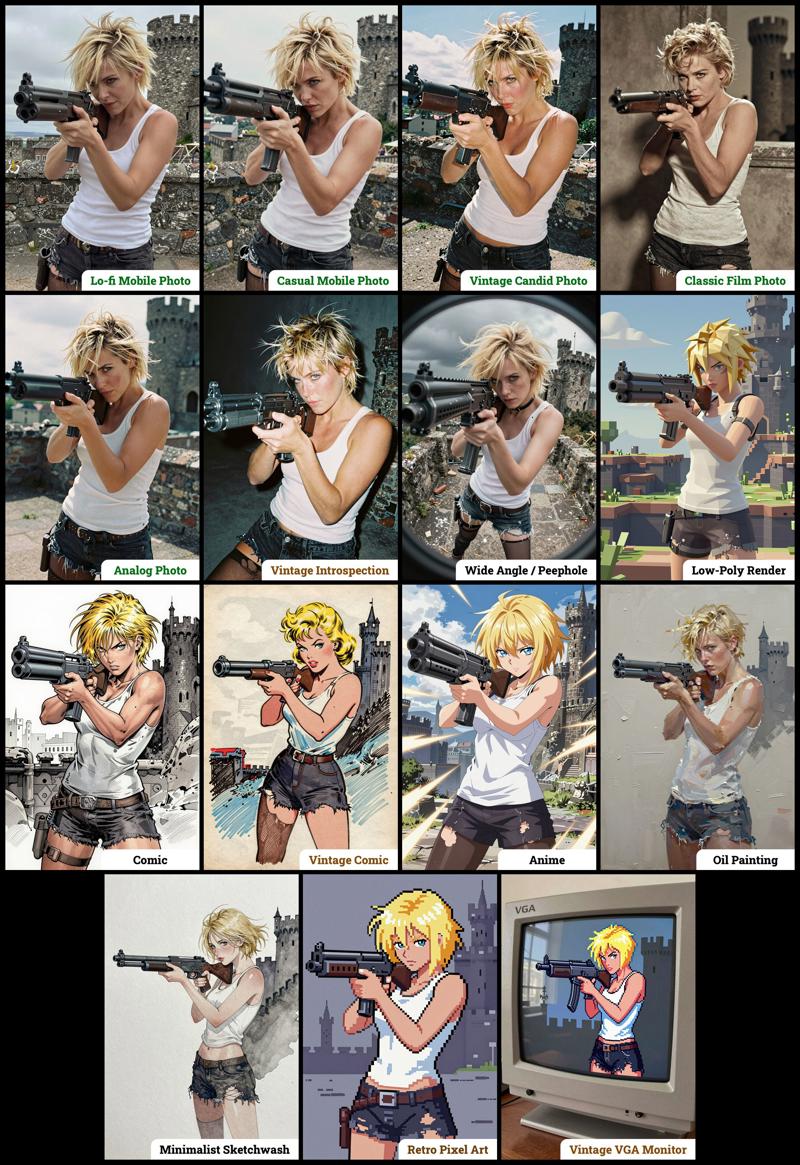
Workflow Overview
The zip contains two workflow files:
1. "amazing_zimage-GGUF.json": Recommended for GPUs with 12GB or less.
2. "amazing_zimage-SAFETENSORS.json": Based directly on the ComfyUI example.
You'll often come across discussions about the best file format for ComfyUI. Based on my experience, GGUF quantized models offer a better balance between compactness and maintaining good prompt response compared to SafeTensors versions. However, it's also true that ComfyUI has internal speed enhancements that work more effectively with SafeTensors, which might lead you to prefer larger SafeTensors files. The reality is that this depends on several factors: your ComfyUI version, PyTorch setup, CUDA configuration, GPU type, and available VRAM and RAM. To help you out, I've included links below to various checkpoint versions so you can determine what works best for your specific system.
Required Checkpoints Files
For amazing_zimage-GGUF.json
z_image_turbo-Q5_K_S.gguf [5.19 GB]
local directory:ComfyUI/models/diffusion_models/Qwen3-4B.i1-Q5_K_S.gguf [2.82 GB]
local directory:ComfyUI/models/text_encoders/ae.safetensors [335 MB]
local directory:ComfyUI/models/vae/4x_Nickelback_70000G.safetensors (for image enhancer) [66.9 MB]
local directory:ComfyUI/models/upscale_models/4x_foolhardy_Remacri.safetensors (for image enhancer) [66.9 MB]
local directory:ComfyUI/models/upscale_models/
For amazing_zimage-SAFETENSORS.json
Based directly on the official ComfyUI example,
z_image_turbo_bf16.safetensors (12.3 GB)
local directory:ComfyUI/models/diffusion_models/qwen_3_4b.safetensors (8.04 GB)
local directory:ComfyUI/models/text_encoders/ae.safetensors (335 MB)
local directory:ComfyUI/models/vae/4x_Nickelback_70000G.safetensors (for image enhancer) [66.9 MB]
local directory:ComfyUI/models/upscale_models/4x_foolhardy_Remacri.safetensors (for image enhancer) [66.9 MB]
local directory:ComfyUI/models/upscale_models/
Required Custom Nodes
The workflows require the following custom nodes:
(which can be installed via ComfyUI-Manager or downloaded from their repositories)
rgthree : https://github.com/rgthree/rgthree-comfy
ComfyUI-GGUF: https://github.com/city96/ComfyUI-GGUF
License
This project is licensed under the Unlicense license.
More info: https://github.com/martin-rizzo/AmazingZImageWorkflow
Amazing Z-Image Workflow
Model Details
- Type
- Generic Asset
- Subtype
- Workflows
- Created
- Updated
- July 9, 2026