Model Information


Description
Civitai Helperで作成される.civitai.infoファイルを使って指定したフォルダ内にあるLoRA(.safetensors)、Embeddings(.safetensors, .pt)のリストを生成します。
0.2.1.0でCivitAI Browser+とCIVITAI-Download-Managerにも対応出来たっぽいです。
なのでCivitai Helper、CivitAI Browser+、CIVITAI-Download-ManagerでLoRAの管理をされていない方は全く無意味なツールです。
生成されたテキストファイルをDynamicPrompts等のWildcardsフォルダに入れてご活用下さい。
一応、Windowsが日本語以外の場合は英語表記になるはずです。
使い方
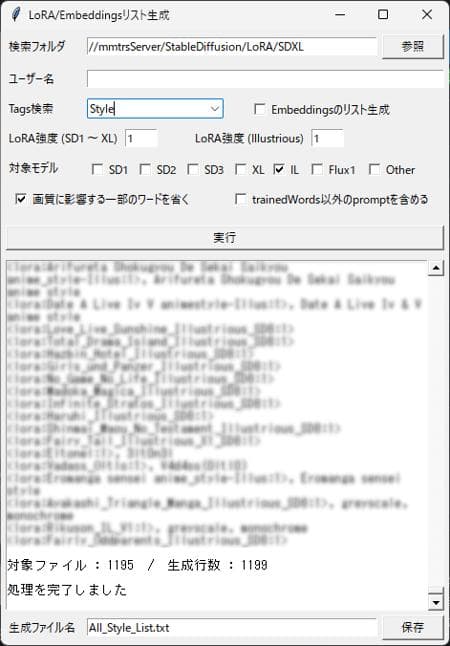
検索フォルダ...リスト生成したいLoRAやEmbeddingsが入っているフォルダを指定します。指定したフォルダ内にサブフォルダがあっても無視します。サブフォルダ内にもリスト生成したいLoRAが入っている場合はそのサブフォルダも個別にリスト生成して自力でリストを結合するなりしてください。
ユーザー名...リスト生成したいLoRAの作者(civitaiでのユーザー名)を指定してください。複数の指定は出来ません。ユーザー名が空の場合は全LoRA作者が対象になります。 (パス名として不適切な文字は削除されます)
Tags検索...リスト生成したいLoRAの種別(Character/Style/Poses/Clothing/Concept/Background)を選んでください。animeやsexyなど手打ちも可能です。複数の指定は出来ません。
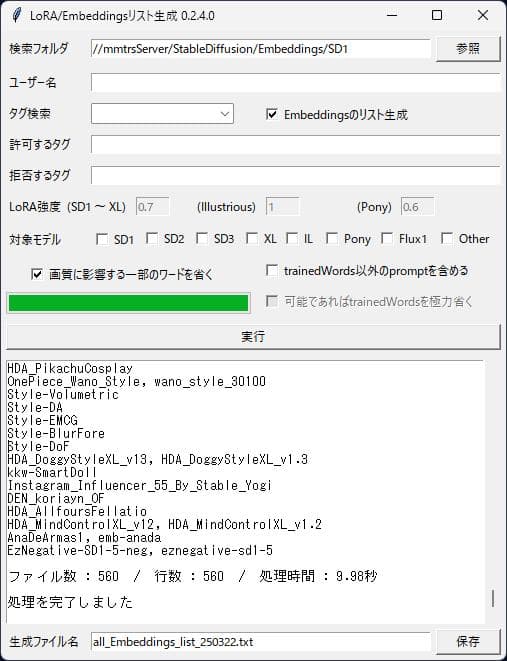
Embeddingsのリスト生成...そのままの意味です。.safetensors以外の.ptファイルにも対応したハズです。
LoRA強度(SD1 ~ XL)...safetensorsのEmbeddingsにもこの数値が適用されます。
LoRA強度(Illustrious)...Illustrious系の時に反映される強さです。.safetensorsのEmbeddingsにもこの数値が適用されます。
対象モデル...全部レ点なしで全てが対象になります。XLとILは同時使用可で、Otherは全てと同時使用可です。一部の方がLoRA等をOtherとかで公開してる方がいて(SD1のBra使用の方とか).civitai.infoだけでは判別しきれないので同名の.JSONファイル参照したり同名の.safetensors本体の内部参照して可能な限り判別します。
画質に影響する一部のワードを除く...そのままの意味です。リスト生成する際にmasterpieceやbest qualityやscore_?等をそのまま含めるか省くかです。完全に除くのは無理で稀に誤認識で正常にプロンプトを抽出できない事があります。ガチャで画像生成しておかしいな?って感じたら自力で修正してください。
trainedWords以外のpromptを含める...そのままの意味です。リスト生成する際にpromptの記載をそのまま含めるか省くかです。自分的にはCharacterのリスト生成時は含めますがStyleなどはtrainedWordsのみにしてます。ネガティブプロンプトは全無視です。
生成ファイル名...生成したリストを保全するファイル名(.txt)を指定します。上記のユーザー名とLoRAタイプから勝手にファイル名が変更されるのでそのまま使うなり修正するなり全消しして手打ちするない好きにして下さい。手打ちした後にユーザー名やTags検索を弄るとせっかくの手打ちが消えるので注意してください。
実行ボタンで生成します。生成ファイルの保存先に同名のファイルが有っても問答無用で上書きするので注意してください。
バージョン0.1.0.0で仕様変更し、生成しただけではファイルの作成はされません。生成した後に生成ファイル名の保存ボタンを押して保存してください。
* 一時停止ボタンは未実装です。 0.1.1.0で実装しました。
* Pythonからのコンパイルで電子署名もしていないのでセキュリティソフト等でウィルスやマルウェアの誤検知があるかもしれません。サポートできないのでその場合は使用を諦めてください。
* Flux1のLoRAリスト生成は対応しておりません。対応しません!...対象モデルにFlux1とありますが、たぶん生成しても滅茶苦茶で使えないかと...
* 私個人が使いやすいように制作してあるので機能追加やバグ修正依頼などは一切受け付けません。自己責任で使用してください。
* 生成した後、結果が空でも空ファイルを保存できてしまう間抜けな状態ですが許してください。気が向いたら修正します。 0.1.1.0で対策しました。
:
:
:
The .civitai.info file created by Civitai Helper is used to generate a list of LoRA (.safetensors) and Embeddings (.safetensors, .pt) in the specified folder.
It seems that CivitAI Browser+ and CIVITAI-Download-Manager can be supported in 0.2.1.0.
Therefore, if you are not managing LoRAs with Civitai Helper or CivitAI Browser+ or CIVITAI-Download-Manager, this tool is completely useless.
Please put the generated text file into the Wildcards folder of DynamicPrompts, etc.
The file should be written in English if your Windows is not Japanese.
How to use
Search Folder... Specify the folder containing the LoRAs and Embeddings for which you want to generate a list. Subfolders within the specified folder will be ignored. If the sub-folder also contains LoRAs you wish to generate a list of, please generate the list of the sub-folders individually and merge the list by yourself.
User Name... Specify the author (user name in civitai) of the LoRA you wish to generate a list for. You cannot specify more than one. If the user name is empty, all LoRA authors will be targeted. (Characters that are inappropriate as path names will be deleted.)
Tags Search... Select the type of LoRA (Character/Style/Poses/Clothing/Concept/Background) for which you want to generate a list. You cannot specify more than one type.
Embeddings list generation... It means just what it says. It should be able to handle .pt files other than .safetensors.
Strength (SD1 - XL)... This value is also applied to Embeddings in safetensors.
Strength (Illustrious).... This is the strength that is reflected during Illustrious system. This value is also applied to Embeddings in .safetensors.
Omit some words that affect Quality... It means exactly what it says. When generating the listings, you can include or omit masterpiece, best quality, score_? and so on are included or omitted when generating the listings. It is impossible to exclude them completely, and in rare cases, the prompts may not be extracted correctly due to misrecognition. If you feel something is wrong with the image generated by the gacha, please correct it by yourself. If you feel something is wrong, please correct it by yourself.
Include non-trainedWords prompts... It means exactly what it says. When generating a list, you can choose to include or omit the description of the prompt as it is. For me, I include it when generating a list of Character, but only trainedWords for Style and so on. Negative prompts are ignored.
Generate FileName... Specify a file name (.txt) to preserve the generated list. The file name will be changed without your permission from the user name and LoRA type above, so use it as it is, or modify it, or delete it entirely and do not type it in manually. Please note that if you change the user name or tags search after typing the file name by hand, your hand-typed file name will disappear.
Click the Generate button to generate the file. Note that even if there is a file with the same name in the destination of the generated file, it will be overwritten without question.
The specification was changed in version 0.1.0.0 and the file is not created just by generating it. After generating the file, click the Save button to save the generated file name.
* Pause Button is not implemented.
* Since it is compiled from Python and not digitally signed, there is a possibility of false detection of viruses and malware by security software. We cannot support it, so please give up using it in that case.
* LoRA list generation for Flux1 is not supported. Not supported! Flux1 is listed as the target model, but it is probably too messed up to be usable even if it were generated...
* I personally created this software to be easy to use, so I do not accept any requests for additional functions or bug fixes. Please use at your own risk.
* Please forgive me for the dumb state of the file, which allows saving an empty file even if the result is empty after it is generated. I will fix it when I get around to it. The countermeasure has been addressed in 0.1.1.0.
Translated with DeepL.com
Make LoRA List
0.2.0.0
Model Details
- Type
- Generic Asset
- Subtype
- Other
- Created
- Updated
- July 19, 2026