Model Information




Description
Support me at: https://ko-fi.com/makina69
Kpop Diffusion discord group: https://discord.gg/yYHVbNxD
Quick tips on the easiest way to start your Flux journey from my experience so far:
Forge - this has the familiar WebUI A1111 style if you just can't be bothered to learn comfy.
github.com/lllyasviel/stable-diffusion-webui-forge/releases/download/latest/webui_forge_cu121_torch231.7z
To unzip 7z file: www.7zip.orgStart > Command Prompt as Administrator then go to the unzipped folder and run update.bat then
run run.bat to start the webui.Get the checkpoint flux.1d fp8:
huggingface.co/lllyasviel/flux1_dev/blob/main/flux1-dev-fp8.safetensorsClip_l & t5xxl_fp8_e4m3fn & put them in /models/textencoders of your Forge directory
huggingface.co/comfyanonymous/flux_text_encoders/tree/mainPut this in /models/vae: huggingface.co/black-forest-labs/FLUX.1-schnell/resolve/main/ae.safetensors
Realism Lora, put in /models/lora - civitai.com/models/631986/xlabs-flux-realism-lora
This is optional, you can use your own favourite upscaler. ESRGAN/4x_NMKD-Superscale-SP_178000_G.pth · uwg/upscaler at main (huggingface.co)
Put in /models/ESRGAN
Below is the usual settings I use: (Use LMS for best skin texture)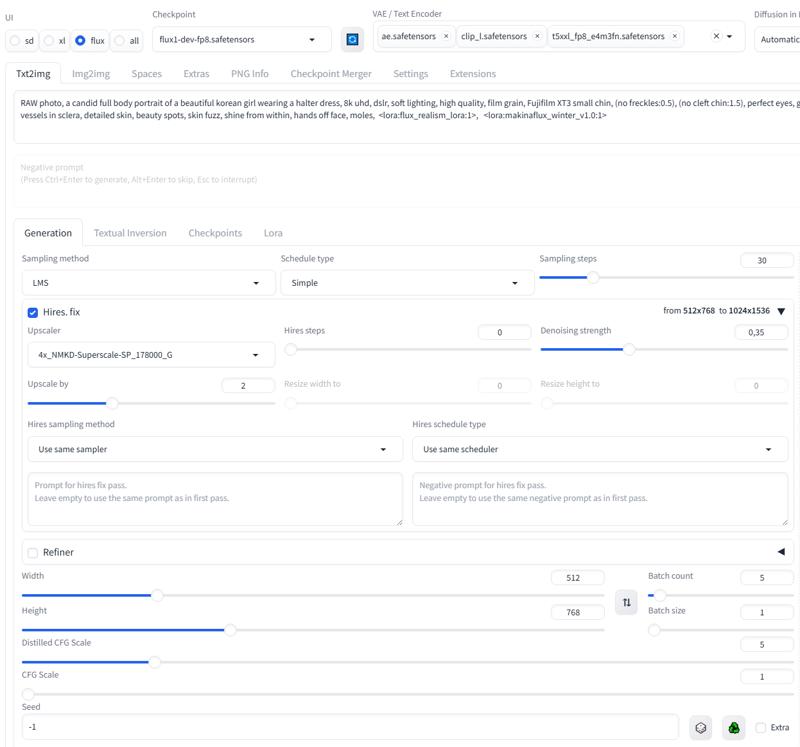
Sulyoon Makina FLUX
v1.1
Model Details
- Type
- Model Addon
- Subtype
- LoRA
- Created
- Updated
- July 27, 2026